The fastest way to judge a Bangkok podcast studio is to check eight signals. Start with four: audio (mic + acoustic treatment), set design (room and background), lighting (multi-layer, not one overhead bulb), and camera (real 4K, multiple angles). If a studio can’t clearly answer all four, expect an amateur-looking result regardless of price.
Why These Signals (and Not Price)?
Most buyer’s guides for podcast studios lead with price. That’s the wrong first filter. Viewers and clients judge a studio by what they see and hear in the output, not by the invoice — the top-performing local studio accounts win by teaching concrete production signals, not by undercutting on rate. Price matters, but it’s a second-round filter after a studio clears these four bars. (For rates specifically, see our Bangkok podcast studio pricing guide.)
Signal 1: Is the Audio Actually Broadcast-Grade?
Audio is the signal listeners notice first and forgive least — a podcast can survive mediocre video, but not mediocre sound.
What to check:
- Mic model. Ask what microphone is on the boom/stand. Broadcast-standard dynamic mics (e.g., Shure SM7B) reject room noise far better than USB desk mics or lavaliers alone.
- One mic per speaker. Multi-guest shows need a dedicated mic per person, not one mic shared or a single room mic picking up everyone.
- Acoustic treatment, not just a “quiet room.” Foam panels, bass traps, or a treated booth reduce echo and reflections. A quiet room with hard walls and glass still sounds hollow on playback.
- Ask for a raw audio sample. Any studio worth booking will play or send a short unedited clip so you can hear it before committing.
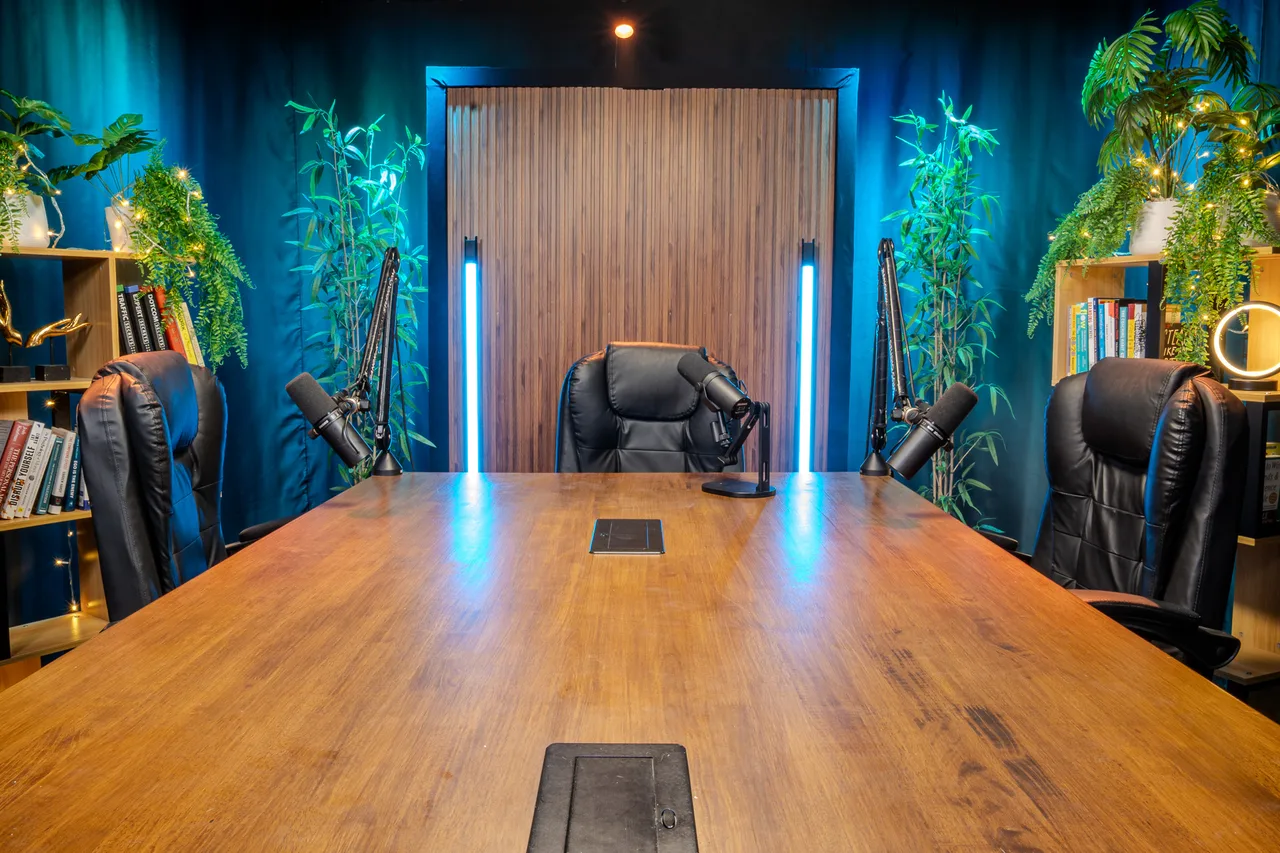
Bangkok Podcast Studio’s rooms run Shure SM7B mics per speaker on production consoles inside acoustically treated spaces — the kind of setup worth using as your comparison baseline when you shortlist other studios.
Signal 2: Does the Set Actually Match Your Brand?
The set is the first thing a viewer registers on YouTube or Instagram before a single word is spoken.
What to check:
- Photos of the actual room, not stock renders. Studios sometimes show a “concept” set that isn’t what you’ll record in.
- Room depth and layering. A flat backdrop looks like a green screen even when it isn’t. Look for furniture, shelving, or set pieces that create foreground/midground/background layers.
- Capacity match. A two-person “confessional”-style room won’t work for a 4-person panel — check the room is built for your guest count, not just your host count.
- Brand neutrality (or brand fit). If you need a plain, brandable background, confirm the set can be dressed down; if you want a distinctive look, confirm it’s distinctive on camera, not just in person.
Signal 3: Is the Lighting Layered, or Just “On”?
Lighting is the signal beginners skip and the one that most reliably separates amateur from professional footage.
What to check:
- Multi-layer setup. Look for at least three light sources doing different jobs: a key light on the face, a rim/hair light for separation from the background, and a background light so the set doesn’t fall into shadow. A single overhead panel flattens faces and kills the set.
- Consistency across cameras. In multi-cam rooms, check that every angle is lit — studios sometimes light the “hero” camera well and leave secondary angles dim.
- No visible flicker or color mismatch. Mixed color temperatures (warm room lights + cool studio lights) show up as an orange/blue clash on camera.
Signal 4: Is the Camera Setup Real 4K, Multi-Angle?
“4K” gets used loosely. The real question is what’s actually capturing your footage and how many angles you get to edit with.
What to check:
- Actual camera model, not just a resolution claim. Full-frame cinema-style cameras (e.g., Sony 4K full-frame bodies) with wide-aperture prime lenses produce noticeably better depth and low-light performance than a webcam or a phone rig labeled “4K.”
- Number of cameras vs. number of speakers. A 3–4 person panel needs 3–4 cameras (one per speaker plus a wide) to cut between angles in edit — a single wide shot means no coverage options later.
- Delivery timeline and format. Ask explicitly: same-day Full HD? 4K within 24 hours? Raw files on-site? A studio that can’t answer this clearly probably doesn’t have a real post-production pipeline.
- Color grading. Ungraded 4K straight off the sensor looks flat. Confirm whether basic color grading is included or an extra line item.
The 8-Signal Checklist (Copy-Paste for Your Shortlist)
| Signal | Ask This | Red Flag |
|---|---|---|
| Audio | “What mic model, and is it one per speaker?” | Vague answer, or one shared room mic |
| Set | “Can I see photos of the actual room I’ll record in?” | Only stock/render images offered |
| Lighting | “How many light sources, and are all camera angles lit?” | Single overhead light, uneven multi-cam lighting |
| Camera | “What camera model, how many angles, what’s the delivery timeline?” | Can’t name the camera or the turnaround |
| Delivery | “Do I leave with my files today, and is there a rush fee?” | Files sent 3 to 5 working days later, express charged extra |
| Hours | “Can I record on a weekend or after 6pm?” | Weekday office hours only |
| Backup | “Do you keep a backup, and for how long?” | Deleted after two weeks, or no answer |
| Scale | “Can I bring 4 guests, add a remote guest, or block a full content day?” | Solo or two-seat rooms only, no live or remote option, no bundle |
If a studio answers all eight clearly and can back it up with samples, it clears the bar. If it dodges two or more, keep looking.
How Bangkok Podcast Studio Hits All 4 Signals
As a concrete reference point (not the only option in Bangkok, but a useful benchmark): Bangkok Podcast Studio’s rooms pair Shure SM7B mics per speaker with acoustically treated walls (audio), dressed multi-person sets built per room capacity (set), multi-layer key/rim/background lighting consistent across every camera angle (lighting), and Sony 4K full-frame cameras — up to 4 in the largest room — with delivery as Full HD same day or 4K within 24 hours (camera). Whichever studio you choose, use this same four-part test to compare it.
FAQ
What’s the single most important signal when choosing a podcast studio?
Audio. Viewers tolerate average video far more than they tolerate muddy, echoey, or inconsistent sound — check the mic setup and acoustic treatment first.
How many cameras do I actually need?
One per speaker, plus a wide/establishing angle if budget allows. A 2-person interview needs at minimum 2 cameras to give an editor real cutting options.
Does “4K” always mean good video quality?
No. Resolution alone doesn’t determine quality — sensor size, lens, lighting, and color grading matter more than the resolution number on a spec sheet. Ask for the camera model, not just the resolution.
Can I see the actual room before booking?
Any legitimate studio should share unedited photos or video of the room you will actually record in, not marketing renders. Treat a refusal as a red flag. If you’re new to podcasting altogether, our guide to starting a podcast in Bangkok covers what to line up before your first session.
Is a cheaper studio ever the right call?
Yes, if your content genuinely doesn’t need broadcast polish (e.g., a rough-cut solo audio show). But if you’re building a video-first brand, the signals above are non-negotiable regardless of budget tier — look for a studio that meets them within your price range rather than skipping the check. If you’re still weighing a studio against recording at home, see our full studio vs. home recording comparison.
Comparing your options across the city? See Bangkok podcast studios compared, criterion by criterion, with the date each figure was checked.